Wednesday, 18 January 2012

E - Books

Definition: An electronic file containing text of an existing book but in a more complex form. Most e-books are simply text but can also contain film clips or play music files. They do however come in many formats, each with its own benefits:
- Text e-books:

 the simplest form of an e-book which is just text in a linear form in one document. It’s easily searchable, editable and portable.

- Word e-books:
Word document books are stored in a single word-processed file which allows the user to change the content and layout of the page, as well as input hyperlinks and pictures. The files created tend to be quite large, especially when images are embedded but using this type of e-book is useful when you’re in a group that uses Microsoft Office software.

- Adobe PDF e-books:
usually store in a single PDF file and using this format has been overly successful due to all computers and software manuals now using this format. Websites which allow downloading enable people p download these PDFs which can contain newsletters, reports and articles which are easy to use and read. A PDF creator is required to make a PDF however, but there are a number of features which make it highly useful for making text files. It allows content, chapters and word searching to be enabled plus having dynamic zoom and hyperlinking; even passwords and digital signatures can be involved. Changing a small part of the PDF requires you to re-save the whole PDF


- Reader e-books: This stimulates reading a book as closely as possible and gives the reader access to other feature such as full-searching and book marking pages; there is even a feature which enables the book to read to you. Opening Reader opens your personal library which, when a book is selected, will take you o that book. Microsoft is not the only company to show off this format: Palm, Mobipocket also offer this concept. It works particularly well on POC,s, pocket PCS and PDAs.

Friday, 6 January 2012

The Digital Divide

For many of us, ICT is a necessity: we simply cannot function without it. Every day we encounter new technology which could impact our lives as well as come into contact with vital technology such as TVs, mobile phones and most importantly, computers and their internet access. In spite of our everyday involvement with technology, there are many of us which do not experience a chance to get in touch with technology and this creates a void between those who do use it and those who don’t.

 A simple definition for the digital divide would be the division of those who have access to technology and those who don’t – however it is not as simple as this. The divide is mainly between those who have the opportunity to use technologies such as PCs, the internet and mobile phones as well as those who are educated enough on this technology to be able to work it, and those who are less fortunate in these areas. It has been said in the UK alone, 17 million people are ‘digitally excluded’ and this scale only grows as we enter less developed countries such as India and Africa. The divide is impacted by many different factors some of which include social factors as well as geographical and technological, which prevent people from using devices and technology which could greatly benefit their lives.

The geographical factor of poverty greatly widens this digital divide. In developing countries, many people simply cannot afford to buy computers or phones which we take as a luxury in our first world climate. Money in these countries is usually spent on food or clean water, education or necessities for families. However in the third world, going on the internet or even typing on a computer to some has never been witnessed. Most people do not even know what a computer can do, let alone use it. The language barrier also causes problems; many websites on the internet are written purely in English and some countries have many distinctive languages which would be difficult to translate into. Many people less developed countries also cannot speak English, making many web-pages useless to them.

As mentioned before, many people simply lack the technology with 20% of the UK public not even owning a computer meaning the technological factors also affect the divide and 1 in 4 people have never used the internet. Some cannot afford to buy one with 38% of the public without an internet connection being unemployed and some just don’t think the internet is useful for them, despite there being many benefits for them using it. A lot of people also live in quite rural areas which cannot pick up a internet connection, unlike the inner city and suburb areas which can most likely pick up a connection enabling them to work and surf the net. This widens the divide greatly as it means that people just give up with trying to get into the modern age and seem to just stick to the basics, not exploring the possibilities of the internet and it’s benefits.

The huge amount of social factors also prevents a lot of people from using a computer or accessing the internet. Age is a huge factor which contributes to people not understanding technology. Younger generations have grown up with this technology, witnessing it advancing and them changing with it, even being taught about it in lessons at school. However, it would seem older generations have had to be thrown in to this almost alien technology and expected to cope with it, which is not always possible leaving them to simply give up with trying to understand it. Generations also seemed to be encouraged to use this technology, as it would seem that 90% of new jobs require computer skills. Older generations do not have technology aimed at them, which could leave them feeling like it isn’t meant for them anyway. Some may even think the internet isn’t for them or they don’t really benefit from it with 63% of over-65’s say they see no reason to get online. Disability also comes into creating a divide with it estimated that the disabled are half as likely to use technology like PCs and the internet. Despite many websites trying to aid the disabled on their websites by offering audio features and enlarging the text, it would still seem many people struggle to use technology. Mobile phones can prove almost impossible at times with their small screens and buttons.
The digital divide’s main drawback is the fact that it excludes many different circles of people who simply are not offered the chance to learn more about the technology or who were not educated properly about computers and the internet and phones. It is not the fault of the elderly that they have been subjected into quickly picking up this technology, nor is it the fault of the African children that they will never see a computer in their life purely for where they live; but these factors mean that these people lose out and as a result feel pushed away from this technology. A common phrase used is that they feel that technology ‘is not meant for them’, when technology should aim to suit everyone and everyone’s needs. Another drawback of the digital divide is that many people lose out on employment opportunities due to not being able to use the technology required for them as nearly every job going now implements technology. The effects of the divide do offer positive aspects: one being that those who do understand it are offered more attention and more chances to develop their knowledge by using tutorials and help guides found on the internet. They are able to fully benefit from this technology and feel the full power the internet can give them to aid their everyday lives. If the internet was modified to suit the needs of a visually impaired individual or all text was translated into the many different languages out there, it could reduce the enjoyment of the technology to those who use it most. There needs to be a balance in order for everyone to be able to enjoy technology with minimal negative effects.

It would seem that, despite the new technology produced every day, the digital divide would be narrowing by the day. It would seem that more developing countries are able to get connection to the internet now and more schemes are being set up such as the ‘telephone ladies’. The scheme allows small villages in Bangladesh to receive a loan to purchase a phone and then charge people a small fee to call relatives and loved ones, creating a small business and a win-win situation for both customer and the person owning the phone. Some schools open late to give internet access to both students and parents and some offer classes on how to use this technology, which can aid many people in gaining jobs and basic education on technology. Children are now being encouraged to help the older generation with their technology, teaching them how to open and search on an internet browser as well as use email and even Skype, the popular online service. Digital Divide Data (DDD) has also been set up to teach the disabled to use technology which often results in them getting into a university and higher education, subsequently offering them more job prospects. These ventures as well as others, although small, gradually are managing to bridge the gap for those affected by the digital divide. More concepts that could aim to close the divide could be setting up small internet cafe type buildings in developing areas where people can pay for the internet access they use and also giving tutorials, enabling them to learn about the technology and then putting it into practise. Another idea I think should be put into place is that small communities that have old computers or technology such as mobile phones that they no longer want should sell them at a lower price to enable people to use them and gain jobs and prospects for their lives. As long as they are not wanted, they could hugely benefit those who do not have any technology.

The benefits from narrowing the divide are clear: people are given a chance to use technology which can hugely improve their lifestyle. Although some in developing countries are not given the most luxurious computers or the fastest internet connection speed, they are offered a chance to try the internet and witness its benefits. Closing this divide also means closing the gaps between people and making people connected; those in foreign countries to the rest of the world and especially those who live locally, who can be reunited with family members and loved ones by using Skype and emailing. Everyone is given an opportunity to learn more about technology and be able to use it; this means that future generations will most likely follow these footsteps and everyone will remain connected. It could also mean that we learn more about other cultures who can then broadcast their views and thoughts online. Although, there are many drawbacks to closing the divide, just as there are benefits. Money must be spent by the different Governments of the countries needing technology and the people involved in getting the technology to use. Using the internet isn’t cheap nor is purchasing a computer to use it on, which means that money must be spent and to those who are unemployed and out of work, or those disabled who cannot work, this is difficult. Many tutorials to teach people to use the internet are complicated and can confuse those without a good understanding of it already such as the elderly. Some people simply don’t want to use the internet or be involved in technology; many are scared of it and some just don’t see a purpose in it: persuading these groups to change their views about technology will be difficult and it is nearly certain that they will not want to use the technology, even if given the chance.

References:
http://wiki.answers.com/Q/How_many_people_have_a_computer_in_th_UK
http://dividedbytechnology.co.uk/impacts.html
http://www.chris.fleetwood.dsl.pipex.com/Features/Digital%20Divide.html
http://www.oecd.org/dataoecd/38/57/1888451.pdf (powerpoints)http://www.guardian.co.uk/news/datablog/2010/jul/12/digital-divide-martha-lane-fox
http://en.wikipedia.org/wiki/Digital_divide
http://news.bbc.co.uk/1/hi/technology/4296919.stm
http://www.independent.co.uk/news/education/education-news/bridging-the-digital-divide-516640.html
http://www.21stcenturychallenges.org/60-seconds/what-is-the-digital-divide/
http://www.webopedia.com/TERM/D/digital_divide.html
http://www.btplc.com/Thegroup/BTUKandWorldwide/BTRegions/England/Factsandfigures/AnInsightintoClosingtheDigitalDivide-April2009.pdf


Friday, 18 November 2011

Entertainment and Leisure

There are many ways that technology has changed the way we are entainment and areas of leisure on our lives. It allows more personal creativity and choice and it's simple and relatively inexpensive to product music, video, sound and radio, even books, magazines and artwork, digitally. These types of media are often stored on technology and even transmitted digitally to other people to view.

For example: it's become so much easier to make and record music now, using new technology to aid musicians such as midi input devices, sequences, mixers and sound cards which allow people to even record music at home. Some software can create sophisticated backing tracks just by choosing a musical style whilst computerised drum machines provide a solid rhythmic backing, plus any mistakes can be edited out and even voices can be corrected. This allows tons of variety on the Internet and a lot of new artists to come through and allowing people to grow and progress with their work as they create more.

Technology That Sawtry Uses

- Interactive Whiteboard
- TVs
- Computers
- Laptops
- Touchscreen Netbooks
- Netbooks
- Cameras
- Video camera
- Microphones
- Amplifiers
- Mixers
- Lighting
- Projectors
- Phones
- Intercom
- Electronic Doors
- Wall speakers
- Ammetres
- Electronic Scales
- Finger print machines
- Tills
- The coolers
- Servers
- Phone wires
- Internet
- Wireless Internet

Tuesday, 15 November 2011

Education

It is usually thought that you should attend school from 4 years to 18 years old, then going into a career that would last for the rest of your working life. However, it is now expected that a lot of students who finish school will in fact have a few careers in their lifetime; even in the same job, due to demands which have changed because of new technologies and ways of working. This can force people to change their career path and create many problems and challenges for society and individuals as jobs are receding everyday.
Education is now relying on technology a lot more to deliever better lessons at times and places that suit the person learning. It is said that llecturers dream of having their lecture recorded or live-streamed so that pupils across the country and globe can watch them at the same time or even at different times to their convenience. The UK now can deliver this 'wired up education' so now every school in the country should have access to the Internet and most should also have high speed connections to enable fast browsing in order to complete work. Some schools even have the potential for students being able to pick and mix 'learning objects' so they can create a personalised curriculum that they can learn from, suiting their needs and what they want to focus on. This allows them to also focus more on topics they may struggle with and work that they find fun and interesting instead of focusing on work they have little interest in. However this is more relevant for adult lifelong learner than school-age students. The teacher can have control over what they learn and what resources to create the ideal learning plan suited for an individual.

There are many drawbacks using of the Internet though:
- students are prone to copy large amounts of text to get work completed or to a standard they think is good enough for their teacher. This offers charges of plagiarism if caught by programs which can spot chunks of text which have been copied and even match it to the websites that it originated from.
- the Internet is one of the main places people can express themselves: it's so much easier to create websites and blogs where people can voice their opinions and then state facts which may or may not be true. Students cannot tell the difference between a fact which has been made up or actually found as may websites don't cite where they got their information from. Therefore many students can copy incorrect information or even biased material which may cause problems
- the Internet now is being used as a money-maker it would seem to many newspaper and magazine companies as they now can charge for you to read articles by them; encyclopedia's have also starting doing the same and this means students may still be denied access to correct information.

How I can communicate:

- Email
- Facebook
- Tumblr
- Blogger
- Twitter
- Texting / SMS
- BBM
- Phone call
- Instant Messaging
- Skype
- Forums
- Youtube (if you are a member of the site)
- Photo Sharing Websites

- Communicating IN PERSON
- Letters
- Pigeon mail

Wednesday, 9 November 2011

Flexible Working / Work Life Balance

Working is now a lot more versatile than what it used to be; it's not essential to be in an office working with a team of people. In fact a lot has changed for people working in this modern age:
  • The times at which they work are more flexible
  • The places at which people work are more flexible
  • The contracts they work under are more flexible
Using technology such as laptops, wireless Internet, mobile phones, spreadsheets, etc. have allowed many people to be able to achieve more out of their working hours than they used to. It can give more freedom and self-reliance to staff: people now can carry out work on the train home or take an assignment home and complete it in the comfort of their home on their own hours. Video conferencing allows people to communicate instantly, despite being in different places, even in different parts of the world. It breaks a lot of boundaries that a lack of technology created: advanced software allows a lot of people in jobs to carry out tasks in quicker time and o a better quality. This can be said for graphic designers who now use specified graphic packages, or teacher s who can display their work on interactive whiteboards, or accountants who can work out problems with their computers than than paper, pencils and calculators.

However there are demerits for working in such a way: now as less people are employed to  particular area of work, the responsibility of this work is given to a singular person. This amount of work that they need to do can be quite overwhelming meaning they do not complete it, or finish it to a bad standard, which does not help the company. Work now involves less teamwork, and is now more of an individual job, cut off from other workers so there is now less socialising in the work place. Despite being given the leisure to do work in your own time and in various different places, it can be seen that work now has stopped purely being at the workplace and has invaded our own personal time, away from a person's job where they can live their everyday life. It can be said work slowly is taking over our lives. Another disadvantage to some workers, is that as we live our 24/7, 25 lifestyle relying on shops to do the same, we also rely on the workers to do the same, meaning a lot of workers are forced to work in hours they might feel to be their own time, such as birthdays and Christmas.

I find that flexible working is a high benefit to our jobs. It means that we can now get work done in a more efficient and professional manner, not to mention quicker and easier. I think that the future prospects of flexible working will probably include dding more software for people to use whilst at their jobs, to help make more and more people's job and workload easier to manage, just like a lot of people are finding now. Some jobs may address the issues above of being over-worked and not having a healthy balance of work to personal time, so that workers are not being constantly swamped with work.

Monday, 3 October 2011

Download Services

Software, driver and virus updates are vital to prolong a computer's life expectancy and are not very commonly downloaded over the internet. Many of these can be downloaded in the background, whilst the user uses the computer regularly sand only requires the user to restart their computer for these updates to be active. Often using a dialogue box to prompt and confirm the user whether they want the update, software can easily be added to the computer which can improve its usage and its life expectancy, meaning it can be used for longer. It could be said all software could be delivered in this way, not just updates but however some limitations such as the size of the software, often being quite large, takes several minutes to download and the fact that the user may want a physical copy of the software and manual for future reference. There may also be system failures and the software will need to be reinstalled, which can be a problem for bigger software, instead of small upgrades which wouldn't cause a problem. However downloading software upgrades being downloaded in this way has huge benefits as updates can be applied immediately and often automatically, also being free as the cost of providing them is very low. The fact the updates are so quick and fix problems very quickly, are also huge pluses.

There are three main areas of media that are downloaded now in the modern world: music and videos.
Music downloading first caught on hugely after the introduction of the Apple company with
iTunes where high quality MPEG-4 audio coding is used for the tracks which gives them good compression and a good quality. Companies such as Sony use an ATRAC format which has better compression, however both these formats can be easily converted to MP3. Before iTunes, music downloading was relatively easy too using the MP3 format; it was carried out many by peer-2-peer file sharing services which allowed people to easily share and exchange music tracks with rarely any cost at all, however this is now considered illegal, which lead to companies like Apple who give a legal service of actually buying the tracks, then downloading them for a small cost of 79p a song and £8.99 an album.

Video downloading is similar, with there being many sites on the internet where it's possible to download films and videos and even watch them in browser, to save download space. This is again illegal but also carried other disadvantages such as being filled with potential viruses' and there being no promise of good quality. It's a gamble which could leave you with some films that may not even work, or some with faulty sound or picture etc. Video files are huge compared to audio tracks; they take hours to download which make it less likely to be downloaded off the internet and instead viewed in the browser.
This can be considered illegal with some films found on some websites but in most cases, video streaming is mostly legal using sites like YouTube and TV channel's own websites where they stream their programmes, allowing viewers to watch anything they've missed on the TV online at a more convenient time, such as iPlayer and 4OD. Streaming video requires them to buffer and load partially before beginning to view them, with the video continuaing to buffer as you watch (alternatively, you could wait for the entire video to buffer before watching it). The downside to this is that with a poor connection, the video may take a long time to buffer and you may not be able to watch it for long before it needs to pause to continue buffering.

Books can now also be downloaded and viewed online, using the electronic PDF format as well as HTML, MS Reader and some other formats. These can be downloaded quickly and efficiently due to their
small size.

E-Government


The Government has many online services for the people of the UK to use as Toby Blair stated that IT provides better, more efficient public services. Some of those include:
· tax returns
· university applications
· business incorporations
· vehicle registrations
· driving test booking
· land registrations
· the NHS
· finding jobs
· student finance
· saving energy
· planning retirement
· work and leisure
· living abroad
· financial support and house for the disabled
· income support
· passports
· legal advice
· registering to vote
And many more.

Friday, 30 September 2011

Evaluating an example of online education: Net Frog

The website's homepage where
all the information is avaliable
Net Frog is an educational site used used for carrying out a dissection of a frog online. This website would be mainly used for students who are studying biology and anatomy and would be able to handle the graphic nature of the website.

It guides you through the dissection step-by-step, starting with the set-up, then the incision procedure before going on to the frog's actual organs, finishing with cleaning up and then a quiz. This ensures the website covers all the areas in the dissection, which allows the viewer to get the fully experience. It offers narration, interacting pictures, facts about frogs,  videos, a glossary of the key terms/tools (which are underlined on the website) and images to help you with the various processes. These clever additional factors to the site engage the viewer and retain their attention , allowing them to focus and learn efficiently.

The website is key for people who are learning how to dissect various animals and provides them with resources to help them learn more about it before they attempt it for themselves. Some people may be squeamish around the actual animal, or feel sick at some of the smells which the frog may emit, which prevents them from fully trying it themselves. Using a site like this will allow them to feel comfortable with the procedure, as someone else carrying it out instead of them, whilst they still learn all the vital parts.

It seemed unlikely that this sort of piratical procedure could be carried out online, or to the degree of detail that is achieved by physically dissecting the frog yourself; but the site offers so much information and assistance, that it manages to work. It seems if a dissection of a dead animal can be carried out online, that a huge number of other procedures could, such as science practicals or french speaking tutorials etc. It offers a service to students where they are more likely to engage and listen, and allows them to take part in one of the easiest ways possible: by simply using the Internet. It  opens up the door to many other ways online education could be used and is an exciting prospect.

Tuesday, 27 September 2011

Evaluating an example of online education: Making The Modern World


Exciting Rich Media Scene on the
Making The Modern World website

Making The Modern World is a website aimed for A level and vocational students to help them with their studies and learning about ICT and the internet. The site's main purpose is to display information for students to read from and make notes from for their own personal studies; this purpose to me calls for a site with short snappy notes and an exciting display to catch people's attention and hold it whilst giving them something in an interesting format to focus on and understand.

The site teaches lessons about the history of the internet and some major pieces of technology, as well as some huge major breakthroughs in machinary. The website quotes that the 'Stores Timeline' contains all the "powerful stories about the world we have made through science and invention. It also offers the icons of invention, going into depths about Science, Technology and Medicine, as well as guided tours such as 'Technology as a passport' which is considered vital information for A Level students. 


Example of text on a page
of the website

The first thing I noticed about the website, Making The Modern World, was it's ineresting display and extremely creative graphics on the homepage. The text is clear to read and the site is modern and up to date which what students want. When I went on the page 'Stories Timeline', the timeline graphic caught my attention whilst I rolled my mouse over it, as well as clicking on the indivdual eras to find a sliding driop down menu appear, but as soon as I clicked on the link for 'Personal computers and information networks', it all changed. 
I found the text was underlined and badly displayed in a grey font against a white background; it was also in huge chunks of text which was hard to scan through quickly, as well there being awkwardly played photos: overall just a bad layout. I found having the text displayed this way made it harder to understand and process and take in. I found myself becoming bored instantly and finding it hard to concentrate.

Then I came to the first of the Rich Media Scene which then instantly brightened up the website and made the facts more interesting; I then took in moe information due to the creative animations, such as the spinnng wheel for the companies bidding to become the leaders in the computer market. These rich text scenes where instantly a hit and I felt more excited about the website and more eager to learn. If only the rest of the text about personal computers was as exciting as this. I find that as a education website, that this site doesn't quite offer what students are looking for on it's information: it needs to keep up these colours and graphics on most of it's pages and give smaller bullet pointed facts to quickly make notes from, instead of these huge chunks of text. It needs to be useless and not cause more confusion


Sunday, 25 September 2011

E-Commerce


Online stores
Online stores allow you to browse and then purchase items online, using a credit card, which can be delivered to your house, completely erasing the need to go out to the shops and browse there. The sites often have a homepage and then links to parts of the site dedicated for differently grouped items, such as 'Mens' and 'Womens' for clothes, or grouped items such as 'Chairs', 'Tables' etc. The sites use pictures to display the goods and include information about the products such as price, size, uses and a short description. A shopper can choose an item and put it into a virtual shopping basket, which then totals up the price of every item added. Then you go to separate pages for paying for the costs using a credit card and then for your delivery by adding the address of where you want it delivered to. This way of shopping is comfortable and practical, with all the items on one site for easy searching and finding, plus most sites now take information from you looking at products to then calculate items which you may like. 
Online Banking
Online banking uses computerized systems which allow customers to access and manage their accounts online, instead of having a bank clerk or employee do it for them. This then allows customers to see their balance, make a payment to another account of theirs any time of the day and to also be available to SMS banking, which can notify customers via their mobile phones about any unexpected transactions or to gain information about their account at any time. Like online stores, this allows you to have all your data right in front of you at home, without requiring you to go to your local bank; it's easy and simple and the websites often help you along setting up and account or with any queries you may have. Online banking has to be completely secure though, as phishing can occur quite regularly. An example of phishing would be if you received an email from a site appearing to be your bank, which asks you to give in your details or says you need to enter them to sort out a problem. If you do so, then the site then has your bank details forever and can go into your account on the real website, stealing your identity as well as your money. This sort of activity has occurred on banking websites and also on the well known bidding site eBay and is a serious crime.
Advantages and Disadvantages
The major disadvantage with E-Commerce would be the phishing scam which allows people to steal your money and identity. Another disadvantage is with some online stores such as eBay, there is no guarantee of product quality, so you could be receiving products you've paid a lot for, but are in bad condition. Plus website problems may pause transactions or delay them or even stop them at all, which could mean you lose money.
But the advantages are that you can do things now in the comfort of your own home, without needing to venture out to look for items in stores which might not be available, or going to the the bank to find it's closed when you need money. It's simple as well, with added guidance to help you whilst you search for things and purchase them. E-Commerce also means it's really easy to start up a business and gain money which will enable more sales and more trades to come through online to make money, which is always a plus.
References:http://www.esalestrack.com/blog/2008/09/advantages-and-disadvantages-of.html

Friday, 23 September 2011

Real Time Information System

Real time information, is information that is fed out automatically and quickly on a website, so that people are updated instantly on news or facts all on one site, which is carried out using a system thast can respond to imput immediately.

There are many websites that have real-time information on their page: the BBC website does this with their news updates, adding to them when recent news comes in. Heathrow airport also uses real-time information on the arrivals section of their website, updating all the different flights and when they are expected to land and at which terminal. Buses and train services can use RTI to tell when the bus/train is due at a sop by sending a signal to a satellite in space of it's location, this is then sent to a computer which calculates the time it'll take for the bus/train to reach the stop; then this is shown on a board for people to see. Stock websites and sites where the weather is shown, also are examples of real-time information. By updating these wesbites regularily with new infiormation, people can be kept up to date regularily and all on the same place, within a few minutes.


Advantages of RTI- exceptionally quick information
- updates 24/7 for people to be kept on the loop
- can allow mjaor transactions like stocks to work, which is a huge business
- very convinient for it to all be in one place
- it's a piece of techbnology which can improved on further.

Disadvantages of RTI- complex system which requires a super-loop which can be complicated to work
- there can be no interruptions, or the information being fed might not go through
- there must be someone to update all the information 24/7
- multiple informtation might get cluttered or not posted in chronological order

References:http://www.webopedia.com/TERM/R/real_time.html
http://en.wikipedia.org/wiki/Real-time_data

http://en.wikipedia.org/wiki/Real-time_operating_system
http://www.keil.com/rl-arm/rtx_rtosadv.asphttp://www.derby.gov.uk/TransportStreets/PublicTransport/Buses/realtimeinformation.htm

Wednesday, 21 September 2011

Bulletin boards and Newsgroups


Bulletin boards are a place on the Internet that allow you to post small notices, adverts and messages, as well as uploading and downloading files and images that are there. It has been around since 1978 and there are many bulletin boards being used for discussion forums, which allows individuals to talk about a topic of interest which an online community of people can add to and develop further. Bulletining boards are even used to find free or inexpensive software products.


Newsgroups are considered part of the "old Internet and are very similar to bulletin boards: they allow people to read and post messages into a hierarchy of subjects using an online browser such as Google Groups. The name is made up of two+ parts, separated by full stops and these parts organise the hierarchies. The two common hierachies are most relevant to the topic you searched and the most viewed groups.
There are many different parts to add to your search topic to find the revelant information:
atl. = any conceivable topic
biz. = business, products,services, reviews
comp. hardware, software, consumer information
humanities. = fine art, literature, philosophy
misc. employment, health and much more
news. = information about Usenet, News
rec. = games, hobbies and sport
sci. = applied science, social science
soc. = social issues, culture
talk. = current issues and debates

I used Google Groups to look at the groups for the topic "digital divide" and I found that whilst using Google Groups, some of the discussions did not give the information about the topic, but simply redirected you to a new website about the topic. I thought this was a good way of giving credit to websites, instead of just copying the information across to the group (maybe without referencing the site), but it complicates finding the information and often the website links had been deleted or moved/changed, so the information wasn't accessible. When looking at the discussion, your key words are highlighted for quickly finding the relevant information which allows quick and easy browsing, and most of the discussions aren't that long so you can quickly skim the information. However Google Groups encounters many errors whilst trying to locate discussions which is frustrating when trying to find information, as a lot of the groups that come up, are not available.

Friday, 16 September 2011

Chat, Instant Messaging and SMS


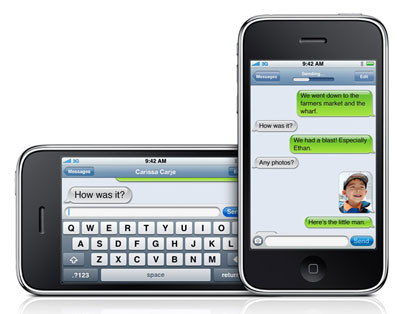
Short Message Service or SMS is a form of sending short brief messages usually via mobile phone and is now a preferred way of communicating over phone conversations. You can type on the phone's keypad a small message e.g. "Hi, how are you?" and then send this message to any one of your contact phone numbers. This is a good way of quickly and also discreetly gaining information from a contact without needing to call the contact which may take up time and the contact may not be able to speak at that time. The only disadvantage of SMS is that if you lose signal, just like with a phone call, you are unable to send your message and gaining signal might take long periods of time. Also it is not as instant as a phone call as some people may not notice the message, as you would a phone call and you are also limited to how many characters you have to write your message.

Instant Messaging (IM) and chat is now available to many social networking sites such as Bebo and Facebook, where you can instantly send messaging
 using your keyboard to a contact. Skype also offers a service where you can both video and voice call as well as IM a contact online, which is amazing feature brought in during 2003. You can also have web-based chats offered by ISPs such as MSN and Yahoo, website-based chat usually found on ISPs such as Virgin and Sky, where you can speak to someone about a specific problem you may be having, private chat rooms online or even by chat rooms on a mobile using SMS. It allows two or even more people to have their own private conversations without other unnecessary people to see as well; the simplest IM services are just between two people, but more advanced IMs allow up to maybe 10 people to converse simultaneously as well as sending images and even files across to each other.

It is used for social purposes and is very popular amongst young people. It allows you to again chat to anyone you want, without a limited amount of characters also well as the fun option to use emoticons to show your emotions whilst conversing. You may also remain anonymous which means your name and any information about yourself cannot be seen which is an interesting feature. IM's name also suggests it can be more instant than SMS, receiving replies quickly. But again it has limitations of needing to be online, with your contacts also being available to chat. Sometimes the sites may crash and you may lose your current conversation or any text you were typing which can be frustrating. The anonymous feature also can promote online bullying as the identity of the bully is not shown and this is an example of cyber bullying which is difficult to track and stop.

Wednesday, 14 September 2011

Email

For many people, emailing someone is just a part of their every day life. With a simple email account name, you can sit and send messages to friends and family, attaching images which you can show them within seconds of receiving, or email a co-worker an important document or PowerPoint needed for a meeting. That same email account name can then set up accounts for various websites, including this one right here. Email is a fundamental aspect of and to think, the first email was sent just 40 years ago by a man named Ray Tomlinson, who was working for a defense department at the time, whilst experimenting with a program they used to send notes to each other on a single computer. It works by using two different things which are able to receive and send your mail. POP3 (Post Office Protocol) downloads your mail from your ISP, whilst SMTP (Simple Mail Transfer Protocol) is able to send mail. POP3 works by taking your email address (e.g. nicole.wheatley.ict@hotmail.co.uk) and the password to your account and then taking all the emails which are labeled to be sent to that account and stores it in your inbox.Your SMTP server will be the same as your POP server so it will take any labelled from you, read the recipient of the mail, and then sends it out to that address. 

The traditional method to send mail would be to use computer or laptop with internet access, but now as technology has advanced, there are more ways to connect with people by sending mail. The iPhone has a Mail application meaning their users can send and receive mails to their phone; other 
smart 3G phones are providing email as well such as HTC and Blackberry.

There are many benefits from using email, such as it's quite a simple to pick up and easy to use service, as well as being free of charge to the user. There is also the huge benefit of being able to send messages to anyone in the world as long as you have exchanged email addresses so contacting distant relatives or business partners is now a lot easier than sending a letter or trying to fax information. You can also send the same information to a range of people and include them in a conversation, so then you can all know the same thing at the same time so no one is kept out of the loop, such as wedding planning and of course at the workplace.

However, with emails come junk mail, an increasingly problematic aspect of email today. A single message is often sent to many recipients as a way of for some companies to gain some business and is often sent a few times to you or repetitively if they continue to use your email address, 
which means a lot of our email inbox is filled quickly with messages so we may lose track of real messages sent for us that we need to reply to, causing complications and confusion. It is predicted nearly 85% of our mail is spam and by opening some spam mail, your computer can often be infected with virus' which shut down your computer and infect your files. Another negative side to using email is that you must have an internet connection to do so, which some people do not possess. 

I think the development of emailing has been a revolutionary things, changing the lives of many by allowing contact to family and friends, whilst also offering a huge help for businesses. I know my father and mother both rely on email hugely in their home life by contacting my Granddad who lives in America and also with their work, with my mother sending important mails about patients and meetings at her doctor's surgery whilst my father is constantly receiving updates about the mortgages and houses sold at the company he works at. For me, email hasn't yet become a huge part of my life that I rely on, but using an email address has helped in the use of many social networking sites. I don't feel there is any way to improve email apart from dealing with the spam and junk-mail issue as it is harmful to the machine you're working on and is irritating to receive.

Tuesday, 13 September 2011

What is a blog?

A blog is a special form of website which can be used like a journal online where you can post thoughts, ideas and work. It is a website that would require you to make your own account where you can sign in and out of your blog, which you can keep personal or you can share to other people. You can personalise a blog and make it your own to suit your personality and it is normally used to regularly keep other people, also interested in what you have to say or do, updated in what’s going on in your life by posting. Blogging can be used to connect to people and can even be used to find more people who have similar ideas and interests to you; you could also possibly make friends whilst running a blog. Blogs can have themes, such as a fan page for a band or actor you like, or it can just be a mixture of things, and there are a range of things you can usually post, such as text posts, images, quotes, video clips and even sound clips, to make sure you can express your every mood freely. Popular blog sites such as Blogger and Tumblr are aimed for all people, of all ages.


On the internet, there are hundreds of blogging sites which enable people to go and express their thoughts and ideas. Some of the most popular sites would be:
Blogger -
www.blogger.com/
Tumblr - www.tumblr.com/
Wordpress - www.wordpress.com/
Live Journal - www.livejournal.com/
Twitter -
www.twitter.com/ (also could be classed as a social networking site)
Weebly -
www.weebly.com/